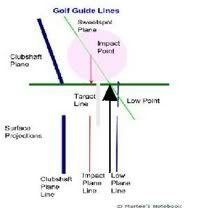
Nice visuals Martee, just make sure the red and blue arrows are both pointing at the Sweetspot Plane, not the ground. They appear to the player to be on the ground. But appearance can be deceiving and this is where things can go wrong (this is what Philly and I was trying to say).
The chunky arrow I've used to vandalise your drawing with shows the line the player actually use to Trace (point at) with. That line is on the ground (and Sweetspot Plane) as the arrow shows. Remember, there can only be one line that lies on the ground and on the Sweetspot Plane (if you don't believe me, try find another one )
Now, can the player use the Impact Point Plane Line or the Low Point Plane Line to Trace with? Yes, with but great caution, because as long as one thinks these alternative lines are on the ground (rather than above or below the ground), they will be tracing the wrong line!
Newbies reading this may be scared of Tracing now because they think it's so complicated. Forget it! You are probably Off Plane by 12 inches, and what we're talking here is a couple of inches max. Just draw a straight line through the white round thing and trace that line.
Nice visuals Martee, just make sure the red and blue arrows are both pointing at the Sweetspot Plane, not the ground. They appear to the player to be on the ground. But appearance can be deceiving and this is where things can go wrong (this is what Philly and I was trying to say).
The chunky arrow I've used to vandalise your drawing with shows the line the player actually use to Trace (point at) with. That line is on the ground (and Sweetspot Plane) as the arrow shows. Remember, there can only be one line that lies on the ground and on the Sweetspot Plane (if you don't believe me, try find another one )
Now, can the player use the Impact Point Plane Line or the Low Point Plane Line to Trace with? Yes, with but great caution, because as long as one thinks these alternative lines are on the ground (rather than above or below the ground), they will be tracing the wrong line!
Newbies reading this may be scared of Tracing now because they think it's so complicated. Forget it! You are probably Off Plane by 12 inches, and what we're talking here is a couple of inches max. Just draw a straight line through the white round thing and trace that line.
The red and blue (Impact & Low) arrowed lines are showing where they show up on the ground, they are already represented as being on the Sweetspot plane with the identification where they start. (Sorry for some reason the Blue line got stretched I will adjust it).
There location on the Sweetspot Plane are two different area and when projected to the ground is what the second diagram was to show from the top down perspective of the golfer.
The line or your arrow point is outside the center of the ball, outside the Target Line. I need to think about this a bit more, but initially I see several potential problems with this. Now if your indicator is the line on which the aiming point would fall, I probably can buy that but are you tracing of driving too? I need to researh this more.
I agree with you caution is needed regarding which line you trace. To trace a line, you need a 'visual' reference point on the club from the top down perspective. Also the line traced or at least the start of the tracing is performed at the location where impact occurs (not the specific part of the ball) not at the separation point.
I think those guys who have been hawking the laser/flashlight training devices that say you should trace the Target Line probably are in the ball park if the device is aligned properly. Having the pointing devices located in both ends of the shaft would not be correct unless they are tracing the clubshaft plane line. Plane Boards trace the clubshaft plane line.
I think I will try to build a very accurate diagram from the down the line view to see exactly how much difference there is to see if in fact the Target Line may be an accurate resultant plane line to trace.
I have been tracing or attempting to trace inside this the Target Line, the Impact Line as I have attempted to show it projection in red on the ground. Tracing the Low Point line required me to identify a different area of the club to line up with.
Note the references to the clubhead are for measuring, not what is being monitored and driven.


 )
)

 Linear Mode


